Just open it
No account, no installation and no server. Open KimaiNext and log your first entry.
 Start for free
 Kimai as it was intended.
Free local time tracking and invoicing, stripped back to the essentials. No server, no account – your data stays in your browser.
In 2006, my team and I built the first version of Kimai. In 2009, I handed the project over; since then Kevin Papst has continued it and grown it into a powerful, full-featured platform for teams and companies. Read the Kimai history
For me as a solo worker, that is often more than I need. KimaiNext is not a replacement for it – it is my counterpoint for people who work alone: deliberately small, local, without a server and without a login. Exactly how I wanted time tracking to feel back then.
— Torsten Höltge, founder of Kimai
Not a revolution built on AI, buzzwords or even more automation. A pretty simple one instead: your tool belongs to you again.
Time tracking is not your work. It is the tedious chore next to it. And yet many tools first want an account, a subscription, a setup and a slice of your attention before you can even log your first minute.
No account, no installation and no server. Open KimaiNext and log your first entry.
Your time entries stay local to you (IndexedDB). With the backup you take them with you in full, any time.
KimaiNext stays deliberately lean. Extra features are enabled only when you need them, as a plugin.
I build KimaiNext because I have always hated time tracking. I still have to do it – so at least I want a tool that gets in my way as little as possible.
Because not everyone wants to build their own time tracker, I make KimaiNext available for free. You don’t just get a limited preview, and you won’t have to take out a subscription later either.
Of course it is not entirely selfless. Kimai was my biggest success as a software developer, and this website makes other projects of mine visible too – some free, some not. But with KimaiNext there is no hidden plan: I need the tool myself, and you get to use it just the same.
your time.
Your time. Your data. Your call.
This is how Kimai was meant to be. And this is KimaiNext again.
No account. No preparation. No commitment.
Many web apps store their data in the cloud by default. That is convenient, but it also creates an attractive target: central servers hold the data of many users in one place. Whoever compromises such a server may, in the worst case, gain access to an entire dataset.
KimaiNext takes a different approach. Your data is stored with IndexedDB directly in the browser on your own device. There is no central data pool that could be mined, sold or stolen in bulk. An attack on a single machine stays limited to that single dataset.
Local storage is not automatically invulnerable. Your own device still has to be protected and secured. The decisive difference lies in how the risk is spread: instead of concentrating all data in one place, it stays where it is created – under your control.
The web app is only the tool. The data belongs to you.
Two decades in three steps.
The first version takes shape: lean, fast, and ahead of its time.
The project moves to Kevin Papst and grows into a large platform.
Back to the original idea: local, minimal, honest. KimaiNext.
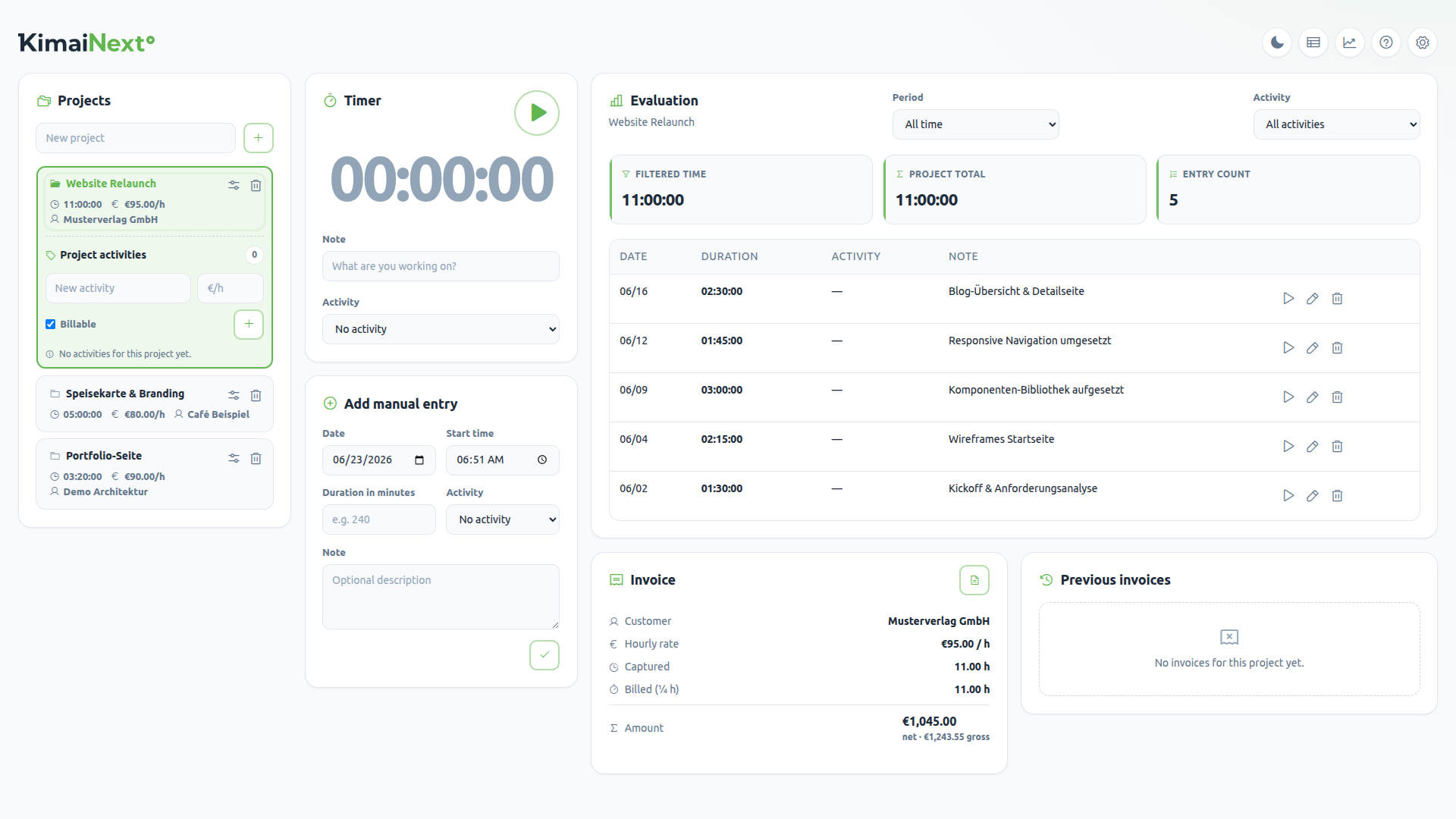
From the first click to the final invoice – lean, local, without the ballast.
Create projects, set hourly rates and customers – the foundation for every invoice.
A round start/stop button. When you stop, a time entry is created automatically.
Add missed time with date, start time, duration, and notes. Edit anything later.
View your week or a single day in a time grid. Move entries with drag and drop, resize them, or create them directly in the calendar.
Turn open entries into a finished PDF invoice – with quarter-hour rounding, logo, and small-business note.
Optional hour or money budgets per project with burn-down bars: green, yellow, red. Ideal for retainers and fixed prices.
Revenue, open amounts, and top projects by day, week, month, or year – with a trend chart, no spreadsheet required.
Save all data as JSON and restore it later, with an optional backup reminder. Older HTML exports are supported too.
Every plugin is included for free. Switch specialized features on when needed and off again at any time – everything still runs locally in your browser.
Create, validate, and view standards-compliant German XRechnung files (UBL 2.1, EN 16931) from any invoice – fully local.
Spot overdue invoices and generate polite-to-firm reminder letters as PDFs.
Record project expenses, mark them as reimbursable, and get reminded when creating an invoice.
A German §19 revenue signal: annual revenue against the 25,000 EUR threshold, split into invoiced and open amounts.
Checks your data for gaps and inconsistencies and fixes them with targeted one-click corrections.
Fill in forgotten time: the day timeline shows entries, breaks, and open gaps. Close gaps one by one or all at once with context-aware suggestions – optionally driven by a work-hours and break profile. All local.
Turn meetings from a calendar-week CSV into time entries, with a preview, selection controls, and duplicate protection.
Sync time entries directly to Jira Cloud as worklogs, with automatic issue mapping, calendar status, and Jira/Tempo CSV as a fallback.
Organize time entries individually or in batches with colored tags. Manage and archive tags; in the calendar they determine each entry’s color.
Open it for free. Done. No installation, no account, no server.
Start the timer or add time manually. Everything stays local in your browser.
Assign a customer, set the hourly rate, print a PDF invoice or export through the XRechnung plugin.
KimaiNext is still before its first public release. Version 1 therefore focuses deliberately on local time tracking for individuals; team features are planned for version 2.
Version 2 is planned as the next larger expansion: central defaults for customers, projects and activities, plus a shared workflow for teams. Local control over each person’s own data should remain intact.
More detail will follow with the roadmap after the first release.
Open KimaiNext for free and record your first entry in under a minute.
Start KimaiNext for freeLaunching in December 2026 – right on Kimai’s 20th anniversary. I want to ship something good, not something half-finished. So it’s worth the short wait.